
linux tar命令解析(压缩解压)(tar指令)(十分之坑,千万不要在windows上解压带有软链接的压缩文件,会把软链接搞没了!软链接丢失、软链接失效)
文章目录
- tar命令简答使用示例
- tar命令使用文档(man 1 tar)
- 英文
- 中文
- 示例
- 注意
- 20220926 如何打包指定目录的文件
- 20230129 用解压tgz的命令解压tar还解压不了。。。
- 20230328 自己注意啊,好几次把压缩.tgz文件的后缀写成.tar,到时候别人弄不清的,因为以gzip压缩和解压都要加-z参数的,别人可能不知道,解压的时候不加-z,就解压不出来!
- 20230329 普通压缩包一般用.tgz,但是用docker save -o生成的镜像包就是.tar,这个注意区分开!
- 20230417 十分之坑,千万不要在windows上解压带有软链接的压缩文件,会把软链接搞没了!
- 20230516 软链接失效测试
- 剪切到windows测试(发现会失效)
- 用winrar打压缩包测试(会失效)
- ubuntu下用tar命令打压缩包测试(不会失效)
- windows上用tar命令压缩测试(会失效)
- 在ubuntu上用tar命令压缩,在windows上用tar命令解压(发现根本解压不了)
- 结论:linux软链接无法在windows上存活,只要其暴露于windows下,就会失效
- 20231030 如何压缩时对软链接解引用,将实际文件打进压缩包?
- 20231115 解决文件时间相对系统时间超前,导致输出大量警告问题(加-m参数,tar -xzmf不提取文件时间,按解压时间赋予文件时间)
- 20240130 也可以把大量警告屏蔽掉,但是不推荐这样做,因为把可能解压的错误信息也屏蔽掉了,如果解压失败,程序将继续往下运行,有点危险(但是正常来说应该不会出问题,可以这样做,因为按照之前加了`-m`参数,导致文件时间都一个样)(但是`2>/dev/null`屏蔽了应有的错误信息,这样做也不靠谱!)
- 2024031 自定义压缩等级,以最快速度压缩
- `gzip: warning: GZIP environment variable is deprecated; use an alias or script`问题
这个命令居然windows控制台也能用!用来解压tgz文件不错@20230228 (要注意不要解压带软链接的,会导致软链接失效!)
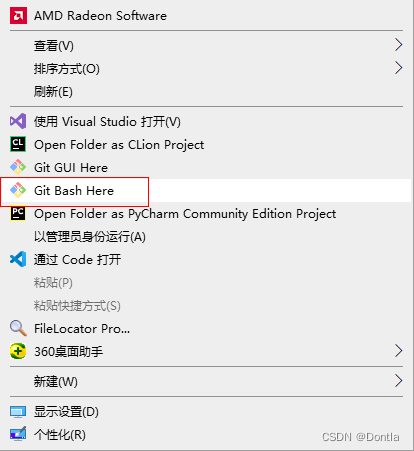
除了windows控制台,git的git bash here也支持这个命令:
tar命令简答使用示例
解压tgz:tar xvzf 压缩包
压缩tgz:tar cvzf 压缩包包名.tar 文件1 文件2 文件3…
压缩tgz时排除文件:tar cvzf kyai.tgz kyai/ --exclude=.docker_temp_652316136
解压tgz到某个目录下:tar -xvzf file.tar -C /path/to/directory
tar命令使用文档(man 1 tar)
英文
TAR(1) User Commands TAR(1)NAMEtar - manual page for tar 1.26SYNOPSIStar [OPTION...] [FILE]...DESCRIPTIONGNU `tar' saves many files together into a single tape or disk archive, and can restore individual files from the archive.Note that this manual page contains just very brief description (or more like a list of possible functionality) originally generated by the help2manutility. The full documentation for tar is maintained as a Texinfo manual. If the info and tar programs are properly installed at your site, the com‐mand `info tar' should give you access to the complete manual.EXAMPLEStar -cf archive.tar foo bar# Create archive.tar from files foo and bar.tar -tvf archive.tar# List all files in archive.tar verbosely.tar -xf archive.tar# Extract all files from archive.tar.DEFAULTS*This* tar installation defaults to:--format=gnu -f- -b20 --quoting-style=escape --rmt-command=/sbin/rmt --rsh-command=/usr/bin/rshMain operation mode:-A, --catenate, --concatenateappend tar files to an archive-c, --createcreate a new archive-d, --diff, --comparefind differences between archive and file system--deletedelete from the archive (not on mag tapes!)-r, --appendappend files to the end of an archive-t, --listlist the contents of an archive--test-labeltest the archive volume label and exit-u, --updateonly append files newer than copy in archive-x, --extract, --getextract files from an archiveCommon options:-C, --directory=DIRchange to directory DIR //切换到目录 DIR-f, --file=ARCHIVEuse archive file or device ARCHIVE-j, --bzip2filter the archive through bzip2-J, --xzfilter the archive through xz-p, --preserve-permissionsextract information about file permissions (default for superuser)-v, --verboseverbosely list files processed-z, --gzipfilter the archive through gzipOperation modifiers:--check-devicecheck device numbers when creating incremental archives (default)-g, --listed-incremental=FILEhandle new GNU-format incremental backup-G, --incrementalhandle old GNU-format incremental backup--ignore-failed-readdo not exit with nonzero on unreadable files--level=NUMBERdump level for created listed-incremental archive-n, --seekarchive is seekable--no-check-devicedo not check device numbers when creating incremental archives--no-seekarchive is not seekable--occurrence[=NUMBER]process only the NUMBERth occurrence of each file in the archive; this option is valid only in conjunction with one of the subcommands --delete,--diff, --extract or --list and when a list of files is given either on the command line or via the -T option; NUMBER defaults to 1--sparse-version=MAJOR[.MINOR]set version of the sparse format to use (implies --sparse)-S, --sparsehandle sparse files efficientlyOverwrite control:-k, --keep-old-filesdon't replace existing files when extracting, treat them as errors--keep-newer-filesdon't replace existing files that are newer than their archive copies--keep-directory-symlinkDon't replace existing symlinks to directories when extracting.--no-overwrite-dirpreserve metadata of existing directories--overwriteoverwrite existing files when extracting--overwrite-diroverwrite metadata of existing directories when extracting (default)--recursive-unlinkempty hierarchies prior to extracting directory--remove-filesremove files after adding them to the archive--skip-old-filesdon't replace existing files when extracting, silently skip over them-U, --unlink-firstremove each file prior to extracting over it-W, --verifyattempt to verify the archive after writing itSelect output stream:--ignore-command-error ignore exit codes of children--no-ignore-command-errortreat non-zero exit codes of children as error-O, --to-stdoutextract files to standard output--to-command=COMMANDpipe extracted files to another programHandling of file attributes:--atime-preserve[=METHOD]preserve access times on dumped files, either by restoring the times after reading (METHOD='replace'; default) or by not setting the times in thefirst place (METHOD='system')--delay-directory-restoredelay setting modification times and permissions of extracted directories until the end of extraction--group=NAMEforce NAME as group for added files--mode=CHANGESforce (symbolic) mode CHANGES for added files--mtime=DATE-OR-FILEset mtime for added files from DATE-OR-FILE-m, --touchdon't extract file modified time--no-delay-directory-restorecancel the effect of --delay-directory-restore option--no-same-ownerextract files as yourself (default for ordinary users)--no-same-permissionsapply the user's umask when extracting permissions from the archive (default for ordinary users)--numeric-owneralways use numbers for user/group names--owner=NAMEforce NAME as owner for added files-p, --preserve-permissions, --same-permissionsextract information about file permissions (default for superuser)--preservesame as both -p and -s--same-ownertry extracting files with the same ownership as exists in the archive (default for superuser)-s, --preserve-order, --same-ordersort names to extract to match archiveHandling of extended file attributes:--acls Enable the POSIX ACLs support--no-aclsDisable the POSIX ACLs support--no-selinuxDisable the SELinux context support--no-xattrsDisable extended attributes support--selinuxEnable the SELinux context support--xattrsEnable extended attributes support--xattrs-exclude=MASKspecify the exclude pattern for xattr keys--xattrs-include=MASKspecify the include pattern for xattr keysDevice selection and switching:-f, --file=ARCHIVEuse archive file or device ARCHIVE--force-localarchive file is local even if it has a colon-F, --info-script=NAME, --new-volume-script=NAMErun script at end of each tape (implies -M)-L, --tape-length=NUMBERchange tape after writing NUMBER x 1024 bytes-M, --multi-volumecreate/list/extract multi-volume archive--rmt-command=COMMANDuse given rmt COMMAND instead of rmt--rsh-command=COMMANDuse remote COMMAND instead of rsh--volno-file=FILEuse/update the volume number in FILEDevice blocking:-b, --blocking-factor=BLOCKSBLOCKS x 512 bytes per record-B, --read-full-recordsreblock as we read (for 4.2BSD pipes)-i, --ignore-zerosignore zeroed blocks in archive (means EOF)--record-size=NUMBERNUMBER of bytes per record, multiple of 512Archive format selection:-H, --format=FORMATcreate archive of the given formatFORMAT is one of the following:gnu GNU tar 1.13.x formatoldgnu GNU format as per tar <= 1.12pax POSIX 1003.1-2001 (pax) formatposix same as paxustar POSIX 1003.1-1988 (ustar) formatv7 old V7 tar format--old-archive, --portabilitysame as --format=v7--pax-option=keyword[[:]=value][,keyword[[:]=value]]...control pax keywords--posixsame as --format=posix-V, --label=TEXTcreate archive with volume name TEXT; at list/extract time, use TEXT as a globbing pattern for volume nameCompression options:-a, --auto-compressuse archive suffix to determine the compression program-I, --use-compress-program=PROGfilter through PROG (must accept -d)-j, --bzip2filter the archive through bzip2-J, --xzfilter the archive through xz--lzip filter the archive through lzip--lzma filter the archive through lzma--lzop--no-auto-compressdo not use archive suffix to determine the compression program-z, --gzip, --gunzip, --ungzipfilter the archive through gzip-Z, --compress, --uncompressfilter the archive through compressNote: You might need to install external program (lzip/ncompress/lzma...) to use some of these compression optionsLocal file selection:--add-file=FILEadd given FILE to the archive (useful if its name starts with a dash)--backup[=CONTROL]backup before removal, choose version CONTROL-C, --directory=DIRchange to directory DIR--exclude=PATTERNexclude files, given as a PATTERN--exclude-backupsexclude backup and lock files--exclude-cachesexclude contents of directories containing CACHEDIR.TAG, except for the tag file itself--exclude-caches-allexclude directories containing CACHEDIR.TAG--exclude-caches-under exclude everything under directories containingCACHEDIR.TAG--exclude-tag=FILEexclude contents of directories containing FILE, except for FILE itself--exclude-tag-all=FILE exclude directories containing FILE--exclude-tag-under=FILEexclude everything under directories containing FILE--exclude-vcsexclude version control system directories-h, --dereferencefollow symlinks; archive and dump the files they point to--hard-dereferencefollow hard links; archive and dump the files they refer to-K, --starting-file=MEMBER-NAMEbegin at member MEMBER-NAME in the archive--newer-mtime=DATEcompare date and time when data changed only--no-nulldisable the effect of the previous --null option--no-recursionavoid descending automatically in directories--no-unquotedo not unquote filenames read with -T--null -T reads null-terminated names, disable -C-N, --newer=DATE-OR-FILE, --after-date=DATE-OR-FILEonly store files newer than DATE-OR-FILE--one-file-systemstay in local file system when creating archive-P, --absolute-namesdon't strip leading `/'s from file names--recursionrecurse into directories (default)--suffix=STRINGbackup before removal, override usual suffix ('~' unless overridden by environment variable SIMPLE_BACKUP_SUFFIX)-T, --files-from=FILEget names to extract or create from FILE--unquoteunquote filenames read with -T (default)-X, --exclude-from=FILEexclude patterns listed in FILEFile name transformations:--strip-components=NUMBERstrip NUMBER leading components from file names on extraction--transform=EXPRESSION, --xform=EXPRESSIONuse sed replace EXPRESSION to transform file namesFile name matching options (affect both exclude and include patterns):--anchoredpatterns match file name start--ignore-caseignore case--no-anchoredpatterns match after any `/' (default for exclusion)--no-ignore-casecase sensitive matching (default)--no-wildcardsverbatim string matching--no-wildcards-match-slashwildcards do not match `/'--wildcardsuse wildcards (default)--wildcards-match-slashwildcards match `/' (default for exclusion)Informative output:--checkpoint[=NUMBER]display progress messages every NUMBERth record (default 10)--checkpoint-action=ACTIONexecute ACTION on each checkpoint--full-timeprint file time to its full resolution--index-file=FILEsend verbose output to FILE-l, --check-linksprint a message if not all links are dumped--no-quote-chars=STRINGdisable quoting for characters from STRING--quote-chars=STRINGadditionally quote characters from STRING--quoting-style=STYLEset name quoting style; see below for valid STYLE values-R, --block-numbershow block number within archive with each message--show-defaultsshow tar defaults--show-omitted-dirswhen listing or extracting, list each directory that does not match search criteria--show-transformed-names, --show-stored-namesshow file or archive names after transformation--totals[=SIGNAL]print total bytes after processing the archive; with an argument - print total bytes when this SIGNAL is delivered; Allowed signals are: SIGHUP,SIGQUIT, SIGINT, SIGUSR1 and SIGUSR2; the names without SIG prefix are also accepted--utc print file modification dates in UTC-v, --verboseverbosely list files processed--warning=KEYWORDwarning control-w, --interactive, --confirmationask for confirmation for every actionCompatibility options:-o when creating, same as --old-archive; when extracting, same as --no-same-ownerOther options:-?, --helpgive this help list--restrictdisable use of some potentially harmful options--usagegive a short usage message--versionprint program versionMandatory or optional arguments to long options are also mandatory or optional for any corresponding short options.The backup suffix is `~', unless set with --suffix or SIMPLE_BACKUP_SUFFIX. The version control may be set with --backup or VERSION_CONTROL, values are:none, offnever make backupst, numberedmake numbered backupsnil, existingnumbered if numbered backups exist, simple otherwisenever, simplealways make simple backupsValid arguments for the --quoting-style option are:literal shell shell-always c c-maybe escape locale clocaleAUTHORWritten by John Gilmore and Jay Fenlason.REPORTING BUGSReport bugs to <bug-tar@gnu.org>.COPYRIGHTCopyright © 2013 Free Software Foundation, Inc. License GPLv3+: GNU GPL version 3 or later <http://gnu.org/licenses/gpl.html>.This is free software: you are free to change and redistribute it. There is NO WARRANTY, to the extent permitted by law.tar 1.26 February 2013 TAR(1)Manual page tar(1) line 457/550 (END) (press h for help or q to quit)中文
TAR(1) 用户命令 TAR(1)名称tar - tar 1.26 的手册页概述tar [选项...] [文件]...描述GNU `tar' 将许多文件一起保存到单个磁带或磁盘存档中,并可以从存档中还原单个文件。注意,此手册页只包含了非常简短的描述(或者更像是可能功能的列表),最初由help2man实用程序生成。 tar的完整文档作为Texinfo手册维护。 如果在您的站点正确安装了info和tar程序,`info tar' 命令应该能让您访问完整的手册。示例tar -cf archive.tar foo bar# 从文件 foo 和 bar 创建 archive.tar。tar -tvf archive.tar# 详细列出 archive.tar 中的所有文件。tar -xf archive.tar# 从 archive.tar 中提取所有文件。默认值*这个* tar 安装默认为:--format=gnu -f- -b20 --quoting-style=escape --rmt-command=/sbin/rmt --rsh-command=/usr/bin/rsh主要操作模式:-A, --catenate, --concatenate将 tar 文件追加到一个存档中-c, --create创建一个新的存档-d, --diff, --compare查找存档和文件系统之间的差异--delete从存档中删除(不在磁带上!)-r, --append将文件追加到存档的末尾-t, --list列出存档的内容--test-label测试存档卷标签并退出-u, --update仅追加比存档中的副本更新的文件-x, --extract, --get从存档中提取文件常见选项:-C, --directory=DIR切换到目录 DIR-f, --file=ARCHIVE使用存档文件或设备 ARCHIVE-j, --bzip2通过 bzip2 过滤存档-J, --xz通过 xz 过滤存档-p, --preserve-permissions提取有关文件权限的信息(超级用户默认)-v, --verbose详细列出已处理的文件-z, --gzip通过 gzip 过滤存档操作修饰符:--check-device创建增量存档时检查设备号码(默认)-g, --listed-incremental=FILE处理新的 GNU 格式增量备份-G, --incremental处理旧的 GNU 格式增量备份--ignore-failed-read不因无法读取的文件而退出非零--level=NUMBER创建 listed-incremental 存档的转储级别-n, --seek存档是可查找的--no-check-device创建增量存档时不检查设备号码--no-seek存档不可查找--occurrence[=NUMBER]只处理存档中每个文件的 NUMBERth 事件;此选项仅在与 --delete、--diff、--extract 或 --list 的子命令一起使用,并且在命令行上或通过 -T 选项给出文件列表时有效;NUMBER 默认为 1--sparse-version=MAJOR[.MINOR]设置要使用的稀疏格式的版本(暗示 --sparse)-S, --sparse高效处理稀疏文件覆盖控制:-k, --keep-old-files在提取时,不替换现有文件,将它们视为错误--keep-newer-files不替换比其存档副本更新的现有文件--keep-directory-symlink在提取时,不替换现有的指向目录的符号链接。--no-overwrite-dir保留现有目录的元数据--overwrite在提取时覆盖现有文件--overwrite-dir在提取时覆盖现有目录的元数据(默认)--recursive-unlink在提取目录之前清空层次结构--remove-files将文件添加到存档后删除它们--skip-old-files在提取时,不替换现有文件,静默地跳过它们-U, --unlink-first在覆盖之前删除每个文件-W, --verify尝试在写入后验证存档选择输出流:--ignore-command-error 忽略子进程的退出代码--no-ignore-command-error将子进程的非零退出代码视为错误-O, --to-stdout将文件提取到标准输出--to-command=COMMAND将提取的文件管道传输给另一个程序文件属性的处理:--atime-preserve[=METHOD]保留转储文件的访问时间,可以在读取后恢复时间(METHOD='replace'; 默认)或者一开始就不设置时间(METHOD='system')--delay-directory-restore延迟设置提取目录的修改时间和权限,直到提取结束--group=NAME强制将NAME作为添加文件的组--mode=CHANGES强制将(符号)模式CHANGES应用于添加的文件--mtime=DATE-OR-FILE从DATE-OR-FILE设置添加文件的mtime-m, --touch不提取文件的修改时间--no-delay-directory-restore取消--delay-directory-restore选项的效果--no-same-owner以你自己的身份提取文件(普通用户的默认行为)--no-same-permissions在从存档中提取权限时应用用户的umask(普通用户的默认行为)--numeric-owner总是使用数字表示用户/组名称--owner=NAME强制将NAME作为添加文件的所有者-p, --preserve-permissions, --same-permissions提取有关文件权限的信息(超级用户的默认行为)--preserve同时具有-p和-s的功能--same-owner尝试提取存档中与原所有权相同的文件(超级用户的默认行为)-s, --preserve-order, --same-order按存档中的顺序提取文件扩展文件属性的处理:--acls 启用POSIX ACLs支持--no-acls禁用POSIX ACLs支持--no-selinux禁用SELinux上下文支持--no-xattrs禁用扩展属性支持--selinux启用SELinux上下文支持--xattrs启用扩展属性支持--xattrs-exclude=MASK指定xattr键的排除模式--xattrs-include=MASK指定xattr键的包含模式设备选择和切换:-f, --file=ARCHIVE使用存档文件或设备ARCHIVE--force-local即使有冒号,也将存档文件视为本地文件-F, --info-script=NAME, --new-volume-script=NAME在每个磁带结束时运行脚本(暗示-M)-L, --tape-length=NUMBER在写入NUMBER x 1024字节后更换磁带-M, --multi-volume创建/列出/提取多卷存档--rmt-command=COMMAND使用给定的rmt COMMAND替代rmt--rsh-command=COMMAND使用远程COMMAND替代rsh--volno-file=FILE在FILE中使用/更新卷号设备阻塞:-b, --blocking-factor=BLOCKS每个记录BLOCKS x 512字节-B, --read-full-records我们读取时重新阻塞(用于4.2BSD管道)-i, --ignore-zeros忽略存档中的零块(表示EOF)--record-size=NUMBER每个记录的字节数,是512的倍数存档格式选择:-H, --format=FORMAT创建给定格式的存档FORMAT是以下之一:gnu GNU tar 1.13.x 格式oldgnu 根据tar <= 1.12的GNU格式pax POSIX 1003.1-2001 (pax) 格式posix 同paxustar POSIX 1003.1-1988 (ustar) 格式v7 旧V7 tar格式--old-archive, --portability等同于--format=v7--pax-option=keyword[[:]=value][,keyword[[:]=value]]...控制pax关键词--posix等同于--format=posix-V, --label=TEXT创建具有卷名TEXT的存档;在列出/提取时,将TEXT用作卷名的通配符模式压缩选项:-a, --auto-compress使用存档后缀来确定压缩程序-I, --use-compress-program=PROG通过PROG过滤(必须接受-d)-j, --bzip2通过bzip2过滤存档-J, --xz通过xz过滤存档--lzip 通过lzip过滤存档--lzma 通过lzma过滤存档--lzop--no-auto-compress不使用存档后缀来确定压缩程序-z, --gzip, --gunzip, --ungzip通过gzip过滤存档-Z, --compress, --uncompress通过compress过滤存档注意:您可能需要安装外部程序(lzip/ncompress/lzma...)才能使用这些压缩选项本地文件选择:--add-file=FILE将指定的FILE添加到归档中(如果文件名以破折号开头时很有用)--backup[=CONTROL]删除前备份,选择版本CONTROL-C, --directory=DIR更改工作目录到DIR--exclude=PATTERN排除模式匹配的文件--exclude-backups排除备份和锁定文件--exclude-caches排除包含CACHEDIR.TAG的目录内容,但标签文件本身除外--exclude-caches-all排除包含CACHEDIR.TAG的目录--exclude-caches-under排除包含CACHEDIR.TAG的目录下的所有内容--exclude-tag=FILE排除包含FILE的目录内容,但FILE本身除外--exclude-tag-all=FILE排除包含FILE的目录--exclude-tag-under=FILE排除包含FILE的目录下的所有内容--exclude-vcs排除版本控制系统目录-h, --dereference跟随符号链接;归档并转储它们指向的文件--hard-dereference跟随硬链接;归档并转储它们所指的文件-K, --starting-file=MEMBER-NAME从归档中的MEMBER-NAME成员开始--newer-mtime=DATE只比较数据更改的日期和时间--no-null禁用之前的--null选项的效果--no-recursion避免自动进入目录--no-unquote不对使用-T读取的文件名进行反引号处理--null -T读取以空字符结尾的名称,禁用-C-N, --newer=DATE-OR-FILE, --after-date=DATE-OR-FILE仅存储比DATE-OR-FILE更新的文件--one-file-system创建归档时保持在本地文件系统中-P, --absolute-names不要从文件名中剥离开头的`/'字符--recursion递归进入目录(默认设置)--suffix=STRING删除前备份,覆盖通常的后缀(除非环境变量SIMPLE_BACKUP_SUFFIX进行了覆盖,默认为'~')-T, --files-from=FILE从FILE获取要提取或创建的文件名--unquote对使用-T读取的文件名进行反引号处理(默认设置)-X, --exclude-from=FILE排除FILE中列出的模式文件名转换:--strip-components=NUMBER在提取时从文件名中剥离前NUMBER个组件--transform=EXPRESSION, --xform=EXPRESSION使用sed替换表达式来转换文件名文件名匹配选项(影响排除和包含模式):--anchored模式从文件名开始处匹配--ignore-case忽略大小写--no-anchored模式可以在任意`/'后匹配(排除的默认设置)--no-ignore-case区分大小写的匹配(默认设置)--no-wildcards精确字符串匹配--no-wildcards-match-slash通配符不匹配`/'--wildcards使用通配符(默认设置)--wildcards-match-slash通配符匹配`/'(排除的默认设置)信息性输出:--checkpoint[=NUMBER]每处理 NUMBER 条记录后显示进度消息(默认为 10)--checkpoint-action=ACTION在每个检查点上执行 ACTION--full-time打印文件时间到其完整分辨率--index-file=FILE将详细输出发送到 FILE-l, --check-links如果并非所有链接都被转储,则打印一条消息--no-quote-chars=STRING禁用对 STRING 中字符的引用--quote-chars=STRING另外对 STRING 中的字符进行引用--quoting-style=STYLE设置名称引用风格;有效的 STYLE 值见下文-R, --block-number在每条消息中显示存档内的块编号--show-defaults显示 tar 的默认设置--show-omitted-dirs在列出或提取时,列出不符合搜索条件的每个目录--show-transformed-names, --show-stored-names展示转换后的文件或存档名称--totals[=SIGNAL]处理存档后打印总字节数;带有参数时,在收到此 SIGNAL 时打印总字节数;允许的信号包括:SIGHUP、SIGQUIT、SIGINT、SIGUSR1 和 SIGUSR2;也接受不带 SIG 前缀的信号名称--utc 以 UTC 时间打印文件修改日期-v, --verbose冗长地列出已处理的文件--warning=KEYWORD警告控制-w, --interactive, --confirmation每个操作前都要求确认兼容性选项:-o 创建时,与 --old-archive 相同;提取时,与 --no-same-owner 相同其他选项:-?, --help提供此帮助列表--restrict禁用某些可能有害的选项--usage提供简短的使用消息--version打印程序版本对于长选项的强制或可选参数,对应的短选项也是强制或可选的。备份后缀默认为 `~',除非使用 --suffix 或 SIMPLE_BACKUP_SUFFIX 进行设置。版本控制可以通过 --backup 或 VERSION_CONTROL 进行设置,值包括:none, off从不创建备份t, numbered创建编号备份nil, existing如果存在编号备份则创建编号备份,否则创建简单备份never, simple总是创建简单备份--quoting-style 选项的有效参数包括:literal shell shell-always c c-maybe escape locale clocale作者由 John Gilmore 和 Jay Fenlason 编写。报告错误向 <bug-tar@gnu.org> 报告错误。版权版权 © 2013 自由软件基金会(Free Software Foundation, Inc.)。许可证 GPLv3+:GNU GPL 版本 3 或之后版本 <http://gnu.org/licenses/gpl.html>。这是自由软件:您可以自由更改和重新分发它。在法律允许的范围内,不提供任何保证。tar 1.26 2013年2月 TAR(1)手册页 tar(1) 第 457/550 行 (结束) (按 h 获取帮助或 q 退出)
示例
待更新。。。
注意
tar xpvf - 解开归档文件('x'),保持文件属主和文件的权限('p'),# 并且把输出的详细信息打印到标准输出 ('v'),# 从标准输入读('f'后跟'-').## 注意'x'是一个命令,而'p', 'v', 'f'是选项.
参考文章:linux shell编程、bash编程、shell教程、bash教程、shell文档、bash文档、shell脚本、bash脚本【教程】第二部分:基础
20220926 如何打包指定目录的文件
压缩:
tar czvf /data/backup/test.tar.gz /data/a/b/directory
解压:
cd /data/testtar xzvf /data/backup/test.tar.gz
问题是,解压后的文件,在/data/test/data/a/b/directory里面
要想解压在当前目录路径。
这样写就可以解决了
tar czvf /data/backup/test.tar.gz /data/a/b/directory
改成
tar czvf /data/backup/test.tar.gz -C /data/a/b/directory
-C是临时切换工作目录,-P是绝对路径,在这里只用到-C参数就行了
参考文章:linux中tar打包指定路径文件
20230129 用解压tgz的命令解压tar还解压不了。。。
解压tgz要加z
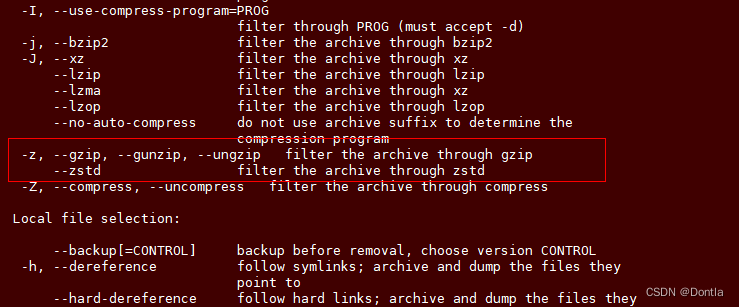
20230328 自己注意啊,好几次把压缩.tgz文件的后缀写成.tar,到时候别人弄不清的,因为以gzip压缩和解压都要加-z参数的,别人可能不知道,解压的时候不加-z,就解压不出来!
20230329 普通压缩包一般用.tgz,但是用docker save -o生成的镜像包就是.tar,这个注意区分开!
20230417 十分之坑,千万不要在windows上解压带有软链接的压缩文件,会把软链接搞没了!
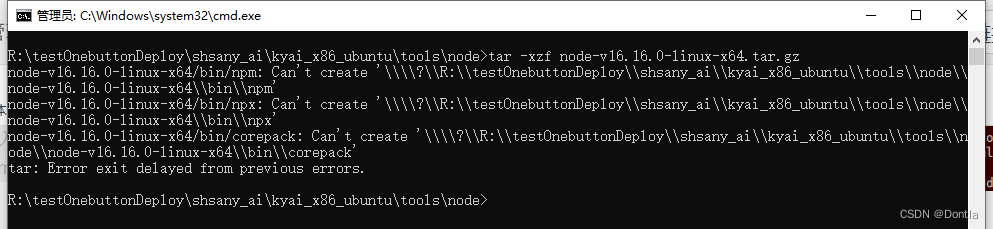
搞了半天,原来是软链接给弄没了。。。
20230516 软链接失效测试
剪切到windows测试(发现会失效)
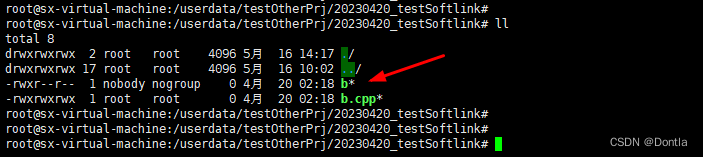
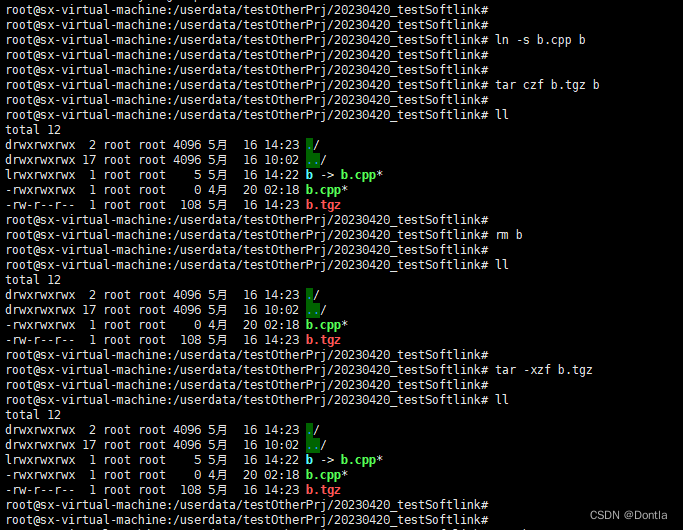
如图,我的ubuntu目录中有一个b.cpp文件,我给它创建了一个软链接:
ln -s b.cpp b
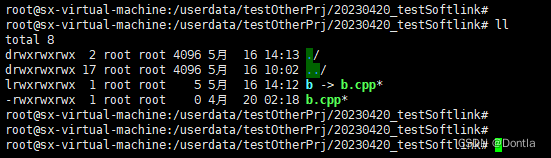
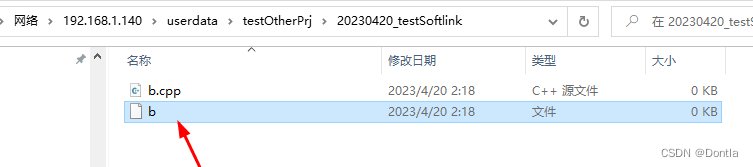
然后我把它剪切到windows桌面上:
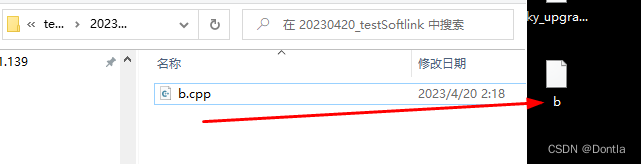
然后我再剪切回去:
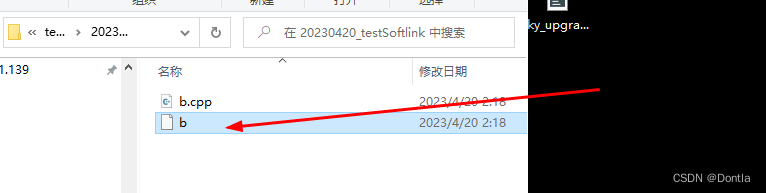
然后我们发现软链接失效了:
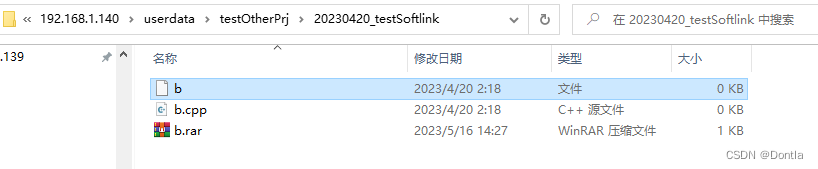
用winrar打压缩包测试(会失效)
如图,我用winrar打了个压缩包,然后再解压,发现软链接失效了:
ubuntu下用tar命令打压缩包测试(不会失效)
如图,在ubuntu里用tar命令打压缩包,再解压不会失效:
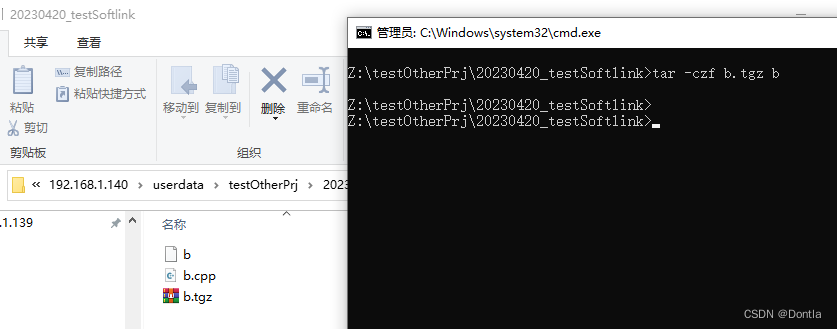
windows上用tar命令压缩测试(会失效)
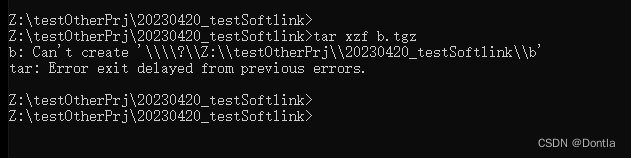
在ubuntu上用tar命令压缩,在windows上用tar命令解压(发现根本解压不了)
在ubuntu上用tar命令压缩软链接,然后在windows上用tar命令解压,发现根本解压不了
结论:linux软链接无法在windows上存活,只要其暴露于windows下,就会失效
20231030 如何压缩时对软链接解引用,将实际文件打进压缩包?
tar -czf 命令默认会保留软链接,不会把软链接转换为实际文件进行压缩。但是如果想将软链接转换为实际文件进行压缩,可以使用 -h 或 --dereference 选项。这个选项会告诉 tar 命令跟踪并包含软链接指向的实际文件。
以下是一个例子:
tar -czhf output.tar.gz input
在这个命令中,output.tar.gz 是输出的压缩文件,input 是要压缩的文件或目录。-h 选项让 tar 将 input 中的软链接转换为它们实际指向的文件。
20231115 解决文件时间相对系统时间超前,导致输出大量警告问题(加-m参数,tar -xzmf不提取文件时间,按解压时间赋予文件时间)
如图,我的系统时间不对,压缩包内文件时间相对系统时间更新,导致输出大量警告:

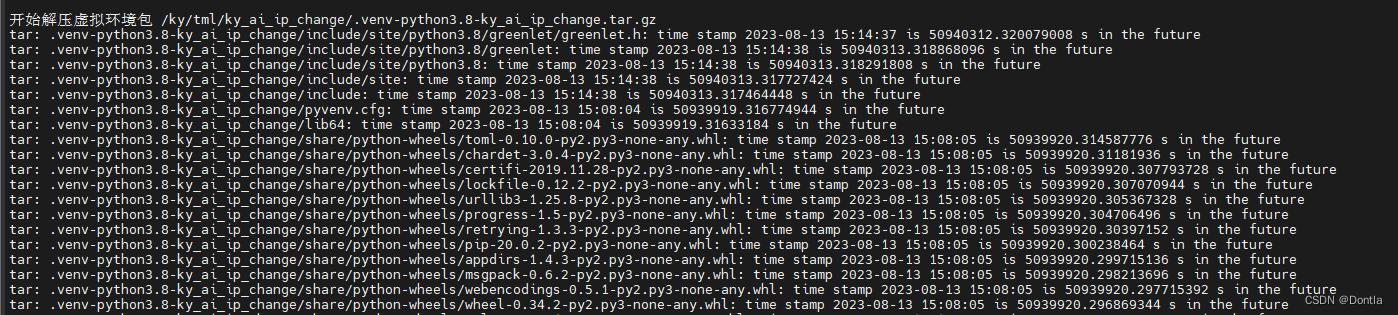
我们解压时加个-m参数就好了,记得不要加在-f参数后,-f参数后是要直接接压缩包的:
示例:
tar -xzmf $DEPLOY_PACK --strip-components=2 -C $INSTALL_PATH
20240130 也可以把大量警告屏蔽掉,但是不推荐这样做,因为把可能解压的错误信息也屏蔽掉了,如果解压失败,程序将继续往下运行,有点危险(但是正常来说应该不会出问题,可以这样做,因为按照之前加了-m参数,导致文件时间都一个样)(但是2>/dev/null屏蔽了应有的错误信息,这样做也不靠谱!)
tar命令在解压文件时,如果遇到文件的时间戳比当前系统时间晚,就会输出一条警告信息。这种情况下,你可以使用重定向操作符将这些警告信息屏蔽掉。
在Linux中,2是标准错误输出(stderr),1是标准输出(stdout)。我们可以通过将stderr重定向到/dev/null(一个特殊的设备,它丢弃所有写入其的数据)来屏蔽警告信息。所以,你可以尝试这样操作:
tar -xzf test.tgz 2>/dev/null这个命令将只打印标准输出(stdout),而忽略所有标准错误输出(stderr)。注意,这样做将屏蔽所有错误信息,包括可能需要注意的重要错误。因此,如果你想在保留其他错误信息的同时,只屏蔽特定的警告信息,可能需要更复杂的处理方式。

2024031 自定义压缩等级,以最快速度压缩
如果你的解压端接口要求使用.tgz格式,但你又希望尽可能减少压缩时间,你可以使用tar命令结合gzip的最快压缩等级。gzip允许你通过-1(也可以用--fast表示)指定最快的压缩速度,虽然这会略微牺牲压缩效率。
要创建一个.tgz文件,同时尽量减少压缩所需的时间,你可以先使用tar命令创建一个未压缩的归档文件,然后用gzip的快速压缩选项来压缩这个归档文件。但是,更简便的方式是直接在tar命令中指定gzip的压缩等级。下面是如何做到这一点的命令:
tar -cvf - /path/to/directory | gzip -1 > archive.tgz
或者,更直接的方法是在tar命令中使用-z参数并通过GZIP环境变量指定压缩等级:
GZIP=-1 tar -czvf archive.tgz /path/to/directory
这两种方法都会生成.tgz文件,同时通过选择最快的压缩等级来减少压缩所需的时间。请将/path/to/directory替换为你想要打包的目录路径。这样,即使你的解压端接口要求使用.tgz格式,你也能在保证文件格式兼容的同时,尽可能地减少压缩时间。
如:
GZIP=-1 tar -czf ${DEPLOY_PACK} ${DIR_TO_BE_COMPRESSED}
gzip: warning: GZIP environment variable is deprecated; use an alias or script问题
如果你在使用GZIP环境变量来设置gzip压缩等级时遇到了“gzip: warning: GZIP environment variable is deprecated; use an alias or script”的警告,这意味着直接通过GZIP环境变量来控制压缩等级的方法已不被推荐使用。作为替代,你可以创建一个别名(alias)或者编写一个简单的脚本来达到同样的目的,不过这在一些情况下可能不太方便。
一个更简单且不会引起警告的方法是直接在命令行中使用管道(pipe)将tar命令的输出传递给gzip,并在gzip命令中明确指定压缩等级。这样可以避免使用已被废弃的环境变量,并且仍然能够控制压缩过程的速度。
修改你的kyai_tar.sh脚本,将创建归档的部分改为下面这样:
tar -cvf - kyai | gzip -1 > kyai_arm_ubuntu_20240314-105323.tgz
这里,tar -cvf - kyai命令会创建一个归档并将其输出到标准输出(stdout),|管道会将这个输出作为gzip -1命令的输入,gzip -1则将其压缩在最快的压缩等级并输出,最后> kyai_arm_ubuntu_20240314-105323.tgz会将压缩后的数据重定向到文件中。
这种方式不会使用到已被废弃的GZIP环境变量,因此不会产生警告,同时仍能实现快速压缩的目的。请确保替换脚本中相应的部分,以适应你的具体需求。