
走进shell
Linux系统启动时,会自动创建多个虚拟控制台。虚拟控制台是运行在Linux系统内存中的终端会话。
打开Linux控制台Terminal使用tty命令查看当前使用的虚拟控制台。
注:tty 表示电传打字机(teletypewriter)
$ tty
/dev/pts/0
表示当前使用的是/dev/pts/0 虚拟控制台。
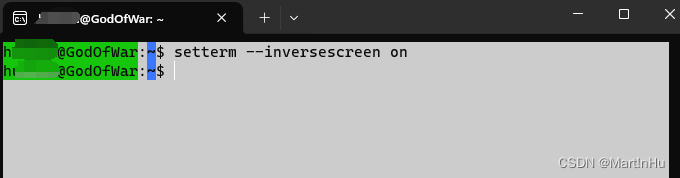
同时可以使用setterm命令设置终端属性,例如
#交换屏幕背景色和前景色  如下图
$ setterm --inversescreen on
inversescreen off:

inversescreen on:
setterm帮助手册如下:
$ setterm --helpUsage:setterm [options]Set the attributes of a terminal.Options:--term <terminal_name> override TERM environment variable--reset reset terminal to power-on state--resize reset terminal rows and columns--initialize display init string, and use default settings--default use default terminal settings--store save current terminal settings as default--cursor [on|off] display cursor--repeat [on|off] keyboard repeat--appcursorkeys [on|off] cursor key application mode--linewrap [on|off] continue on a new line when a line is full--inversescreen [on|off] swap colors for the whole screen--foreground default|<color> set foreground color--background default|<color> set background color--ulcolor [bright] <color> set underlined text color--hbcolor [bright] <color> set half-bright text color<color>: black blue cyan green grey magenta red white yellow--bold [on|off] bold--half-bright [on|off] dim--blink [on|off] blink--underline [on|off] underline--reverse [on|off] swap foreground and background colors--clear [all|rest] clear screen and set cursor position--tabs [<number>...] set these tab stop positions, or show them--clrtabs [<number>...] clear these tab stop positions, or all--regtabs [1-160] set a regular tab stop interval--blank [0-60|force|poke] set time of inactivity before screen blanks--dump [<number>] write vcsa<number> console dump to file--append [<number>] append vcsa<number> console dump to file--file <filename> name of the dump file--msg [on|off] send kernel messages to console--msglevel 0-8 kernel console log level--powersave [on|vsync|hsync|powerdown|off]set vesa powersaving features--powerdown [0-60] set vesa powerdown interval in minutes--blength [0-2000] duration of the bell in milliseconds--bfreq <number> bell frequency in Hertz--help display this help--version display versionFor more details see setterm(1).
以上,通过各种命令于在终端下于Linux系统进行交互,使用的正是shell:
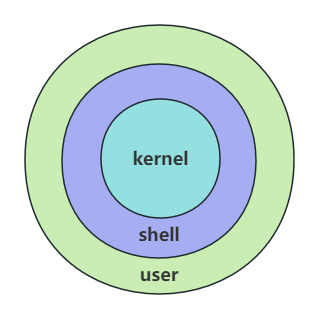
shell 通过提示您输入,向操作系统解释该输入,然后处理来自操作系统的任何结果输出,简单来说shell就是一个用户跟操作系统之间的一个命令解释器。
常见的 shell 有:
- Bourne Shell(/usr/bin/sh或/bin/sh)
- Bourne Again Shell(/bin/bash)
- C Shell(/usr/bin/csh)
- K Shell(/usr/bin/ksh)
- Shell for Root(/sbin/sh)
最常用的shell是Bash,也就是Bourne Again Shell。Bash由于易用和免费,在日常工作中被广泛使用,也是大多数Linux操作系统默认的Shell环境。将在下篇文章中展开介绍。