
pipeline + node +jenkins+kubernetes部署yarn前端项目
1、编写Dockerfile文件
# Set the base image
FROM node:16.10.0# WORKDIR /usr/src/app/
WORKDIR /home/option# Copy files
COPY ./ /home/option/# Build arguments
LABEL branch=${BRANCH}
LABEL commit=${COMMIT}
LABEL date=${BUILD_DATE}
ARG ENV# Set ENV variables
ENV COMMIT_BRANCH=${BRANCH}
ENV COMMIT_SHA=${COMMIT}
ENV BUILD_DATE=${DATE}
ENV INSTALLATION_TYPE=docker
ENV MY_ENV=${ENV}# Install dependencies and compile
RUN yarn install --frozen-lockfile
RUN yarn
RUN yarn build:${MY_ENV}# Expose port 15888 - note that docs port is 3000
EXPOSE 3000# Set the default command to run when starting the container
CMD yarn run start
这个Dockerfile需要传环境变量参数
2、编写pipeline文件
// 参数构建
pipeline {agent anyparameters {gitParameter(name: 'BRANCH_TAG', type: 'PT_BRANCH_TAG', branchFilter: 'origin/(.*)', defaultValue: 'main', selectedValue: 'DEFAULT', sortMode: 'DESCENDING_SMART', description: '请选择需要部署的代码:')choice(name: 'mode', choices: ['deploy','rollback'], description: '请选择发布或者回滚?')choice(name: 'ENVMENT', choices: ['sit','exp','gray','prod'], description: '环境参数')        string(name: 'iname', defaultValue: 'option-front', description: '服务名称')}environment {dest_path = "/var/jenkins_home/workspace/${JOB_NAME}"job_path = "/data/docker-compose/jenkins/jenkins_home/workspace/${JOB_NAME}"mod_path = "/data/docker-compose/jenkins/jenkins_home/mod"}stages {stage('clean'){steps {cleanWs(cleanWhenAborted: true, cleanWhenFailure: true, cleanWhenNotBuilt: true, cleanWhenSuccess: true, cleanWhenUnstable: true, cleanupMatrixParent: true, disableDeferredWipeout: true,deleteDirs: true)}    }stage('从 gitlab 中拉取代码') {when {environment name: 'mode',value: 'deploy'}steps {deleteDir()checkout([$class: 'GitSCM', branches: [[name: "${params.BRANCH_TAG}"]],gitTool: 'Default', userRemoteConfigs: [[url: 'https://gitlab.yunson.com/test/option/option_front.git', credentialsId: 'gitlab-deploy',]]])}}stage('Node Install And Build docker image'){steps{script{sh """docker build --build-arg ENV=${ENVMENT} -t harbor.yunson.com/test/${iname}:$ENVMENT ."""                  }}}stage('Push image to hub'){steps{script{withCredentials([usernamePassword(credentialsId: 'harbor-secret-dev',, passwordVariable: 'password', usernameVariable: 'username')]) {sh 'docker login -u ${username} -p ${password}  harbor.yunson.com'}sh 'docker push harbor.yunson.com/test/${iname}:$ENVMENT'}}}stage('deploy Server'){steps{script{sh """curl -X PUT \-H "content-type: application/json" \-H "Cookie: KuboardUsername=admin; KuboardAccessKey=ccpyiaxei7i8.disiejnk4dg5pfjlobgmflkuefkufdwf" \-d '{"kind":"deployments","namespace":"test","name":"${iname}","images":{"harbor.yunson.com/test/${iname}":"harbor.yunson.com/test/${iname}:${ENVMENT}"}}' \"http://69.36.89.2:18085/kuboard-api/cluster/Test/kind/CICDApi/admin/resource/updateImageTag"    curl -X PUT \-H "Content-Type: application/yaml" \-H "Cookie: KuboardUsername=admin; KuboardAccessKey=ccpyiaxei7i8.disiejnk4dg5pfjlobgmflkuefkufdwf" \-d '{"kind":"deployments","namespace":"test","name":"${iname}"}' \"http://69.36.89.2:18085/kuboard-api/cluster/Test/kind/CICDApi/admin/resource/restartWorkload""""}}}}
}
构建jenkins项目
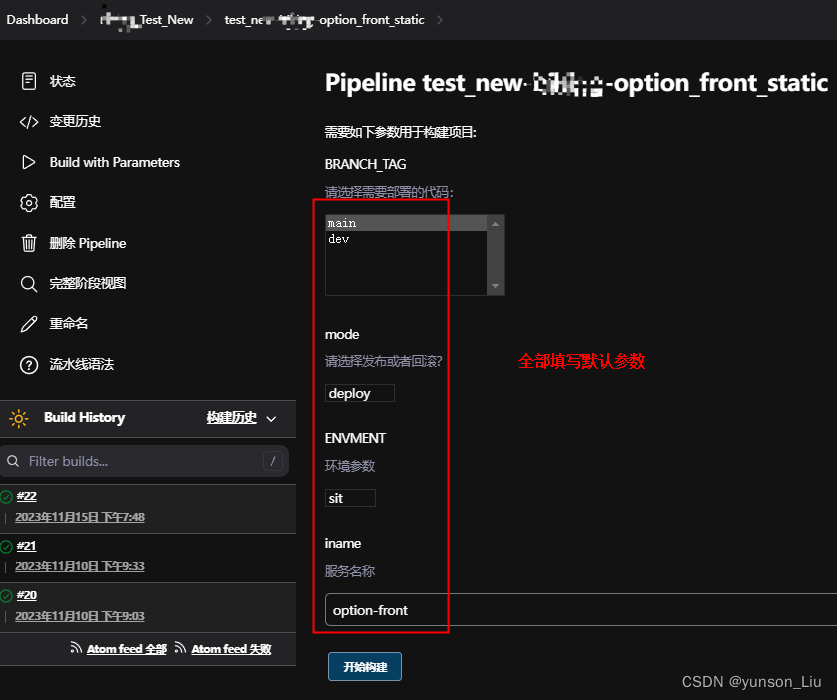
构建成功如下
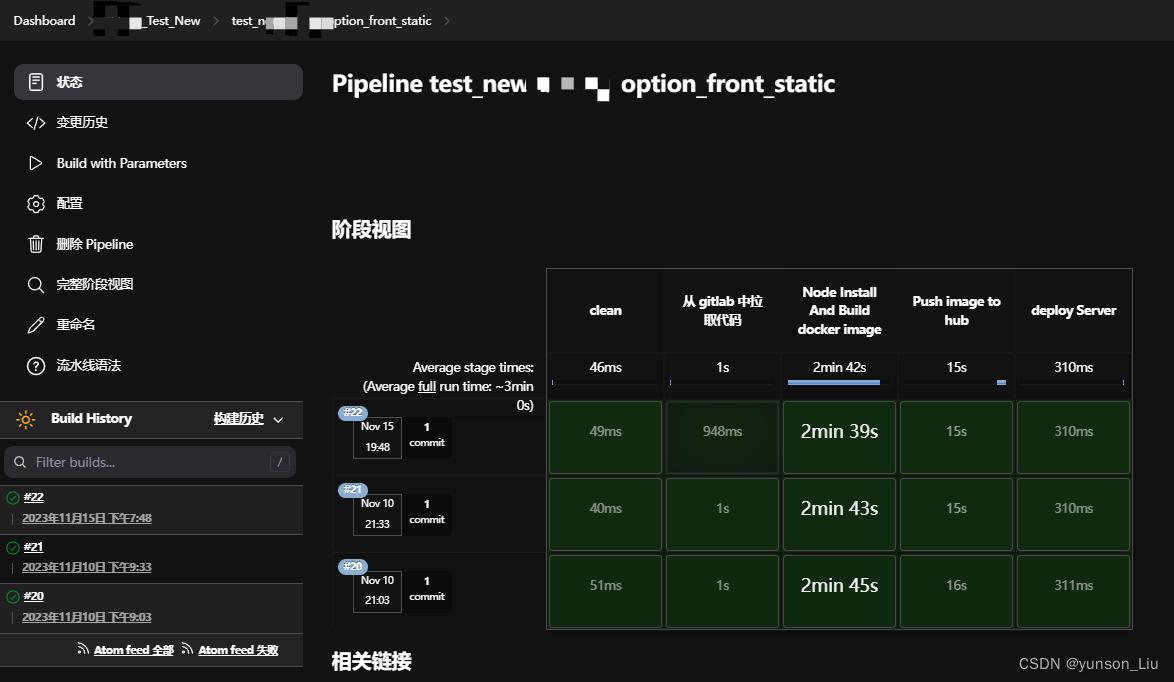
3、编写部署pods的yaml文件
---
apiVersion: apps/v1
kind: Deployment
metadata:annotations:k8s.kuboard.cn/displayName: option-frontlabels:k8s.kuboard.cn/layer: webk8s.kuboard.cn/name: option-frontname: option-frontnamespace: testresourceVersion: '38871139'
spec:progressDeadlineSeconds: 600replicas: 1revisionHistoryLimit: 10selector:matchLabels:k8s.kuboard.cn/name: option-frontstrategy:rollingUpdate:maxSurge: 25%maxUnavailable: 25%type: RollingUpdatetemplate:metadata:annotations:kubectl.kubernetes.io/restartedAt: '2023-11-15T19:51:15+08:00'creationTimestamp: nulllabels:k8s.kuboard.cn/name: option-frontpod-template-hash: 645b77b9cspec:containers:- env:- name: TZvalue: Asia/Shanghaiimage: 'harbor.yunson.com/test/option-front:sit'imagePullPolicy: Alwaysname: option-frontports:- containerPort: 3000name: msag7protocol: TCPresources: {}terminationMessagePath: /dev/termination-logterminationMessagePolicy: FilednsPolicy: ClusterFirstimagePullSecrets:- name: acr-secret- name: harbor-secretrestartPolicy: AlwaysschedulerName: default-schedulersecurityContext: {}terminationGracePeriodSeconds: 30---
apiVersion: v1
kind: Service
metadata:annotations: {}labels:k8s.kuboard.cn/layer: webk8s.kuboard.cn/name: option-frontname: option-frontnamespace: bikingresourceVersion: '31418671'
spec:internalTrafficPolicy: ClusteripFamilies:- IPv4ipFamilyPolicy: SingleStackports:- name: ef5znmport: 3000protocol: TCPtargetPort: 3000selector:k8s.kuboard.cn/name: option-frontsessionAffinity: Nonetype: ClusterIP---
apiVersion: networking.k8s.io/v1
kind: Ingress
metadata:annotations: {}labels:k8s.kuboard.cn/layer: webk8s.kuboard.cn/name: option-frontname: option-frontnamespace: bikingresourceVersion: '38696977'
spec:ingressClassName: biking-ingressrules:- host: option-test.cuiwjrpcvi.comhttp:paths:- backend:service:name: option-frontport:number: 3000path: /pathType: Prefix- backend:service:name: hyperw-optionport:number: 9024path: /service-option-corepathType: Prefix- backend:service:name: hyperw-assetsport:number: 9027path: /hyperw-assetspathType: Prefix- backend:service:name: option-indexport:number: 9029path: /service-option-indexpathType: Prefix- backend:service:name: option-wsport:number: 9090path: /wspathType: Prefix- backend:service:name: hyperw-systemport:number: 9028path: /hyperw-systempathType: Prefix- backend:service:name: legend-indexport:number: 9026path: /public/web/kline/historypathType: Prefix- backend:service:name: legend-indexport:number: 9026path: /public/web/timeline/historypathType: Prefix- backend:service:name: option-wsport:number: 9090path: /service-option-ws/wspathType: Prefix- backend:service:name: hyperw-userport:number: 9023path: /hyperw-userpathType: Prefix- backend:service:name: hyperw-agentport:number: 9033path: /hyperw-agentpathType: Prefix- backend:service:name: hyperw-binary-optionport:number: 9044path: /binary-optionpathType: Prefixtls:- hosts:- test.yunson.comsecretName: yunson.com-ssl